About the Author

Chris Shiflett

Chris Shiflett is an author and speaker who leads the web application security practice at OmniTI.


Secure Logins

I use Yahoo for a few of their services. As Aaron notes, Yahoo makes you log in excessively. This is a bit annoying, especially since each login usually requires multiple clicks for me - I always choose the secure option, because it submits the form over SSL, and this isn't the default. (If my wife has been using the computer, it usually also means that I have to log her out first, but that's another story.)

Recently, Yahoo removed the secure option:

If you read the fine print, however, you'll see "Submits over SSL." The problem is that Yahoo has focused too much on the technical issues and not enough on the social ones. The average user looks for the lock icon when entering sensitive data into a form. Although it's not required that the login form itself be sent over a secure connection, the average user doesn't know this.

If you view source (which is the only way to verify Yahoo's claim prior to submitting the form), you'll see that they're telling the truth:

<form method="post" action="https://login.yahoo.com/config/login?" ...>

Wouldn't it be nice if browsers could give us a visual indication that a form's action uses the https scheme? Imagine a cursor with a lock icon beside it:
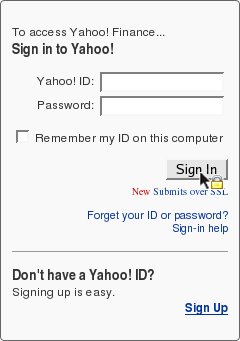
Anyone want to write a Firefox plugin? :-)

About This Post

Secure Logins was posted on Wed, 25 Jan 2006 at 20:09:27 GMT.

31 Comments

1. Nick's GravatarNick said:

Hey, that's a good idea :)

Wed, 25 Jan 2006 at 20:44:35 GMT Link


2. Maarten Manders's GravatarMaarten Manders said:

Excellent suggestion!

Wed, 25 Jan 2006 at 20:50:50 GMT Link


3. Harald Ponce de Leon's GravatarHarald Ponce de Leon said:

What about when you don't use the mouse and hit enter to submit the form?

Isn't this why the default dialog of "You are going to submit data over a secure server" appears when submiting a form, that we all blindly automatically skip on?

A visual notification would be nice however, but a yellow padlock upfront provides no guarantee that the SSL certificate is valid :(

Wed, 25 Jan 2006 at 20:50:52 GMT Link


4. S's GravatarS said:

This was covered in a Security Now podcast (http://www.grc.com/sn/SN-020.txt

-- search for "I have a question about secure web pages")

Like Gibson or not, this is a real problem. My mom knows to use the "secure" version, but she doesn't know how to check.

Especially if the FORM is on a secure page and it posts to a non-SSL page.

I smell a greasemonkey script.. (-:

S

Wed, 25 Jan 2006 at 20:55:11 GMT Link


5. Ingmar's GravatarIngmar said:

Have a look at this tweak in one's userContent.css:

form[action*="https://"] input[type="submit"],

form[action*="https://"] input[type="image"] {

cursor: crosshair;

}

Using a url() to a custom cursor file on a remote server seems to be denied by Firefox. But it's possible to set a different color and so on for the button... quite nice, at least until someone really creates a Firefox extension (or a Greasemonkey User Script) for this ;-)

Wed, 25 Jan 2006 at 21:52:06 GMT Link


6. Andrew Wooster's GravatarAndrew Wooster said:

The only problem with this is that that form wasn't necessarily served over TLS, and thus cannot be trusted, being vulnerable to a variety of tricky Javascript injection attacks.

Wed, 25 Jan 2006 at 22:00:30 GMT Link


7. Chris Padfield's GravatarChris Padfield said:

You can't trust the action of a form, a javascript function could easily change the action when you click the submit button.

Wed, 25 Jan 2006 at 22:55:48 GMT Link


8. thomas's Gravatarthomas said:

not a plugin we all want it built-in

Thu, 26 Jan 2006 at 07:23:29 GMT Link


9. timvw's Gravatartimvw said:

And then we have to wait untill someone generates a javascript overlay that gives users the false impression they are submitting with https...

Thu, 26 Jan 2006 at 10:13:34 GMT Link


10. James Dykes's GravatarJames Dykes said:

It'd be a nice idea... :)

Thu, 26 Jan 2006 at 11:12:42 GMT Link


11. Gabriel Ricard's GravatarGabriel Ricard said:

I'm just glad I don't have to click twice every time I login to yahoo now. :)

Thu, 26 Jan 2006 at 15:44:01 GMT Link


12. soenke's Gravatarsoenke said:

those css selectors fpr html attributes won't work with IE:

form[action*="https://"] input[type="submit"]

:-/

Fri, 27 Jan 2006 at 20:12:23 GMT Link


13. S's GravatarS said:

Take a look at:

http://blog.phpdoc.info/archives/32...easemonkey.html

S

Sat, 28 Jan 2006 at 23:05:28 GMT Link


14. Mumbling Mutant's GravatarMumbling Mutant said:

This Firefox extension kinda does what you are talking about

https://addons.mozilla.org/extensio...ication=firefox

Mon, 30 Jan 2006 at 04:13:20 GMT Link


15. Mike DeWolfe's GravatarMike DeWolfe said:

Nice piece. I've always thought that one of my clients would throw a fit that you're working on a non-secure form, or that you're getting the "Submitting to a secure site" warning. They have done the latter and I've had to move the secure entry point to the very beginning of the process (e.g. as soon as someone enters a catalog), so that the warnings are distant memory by the checkout. Launching anything from your client to a secure server is good. What gets me are the scripts that make the round trip with the data and come back with errors and all of the data you submitted without SSL. If you submit to a secure site and you come back with the errors and you're in a secure environment, why not start in a secure environment with the initial form? That's a rhetorical question. :)

If the CSS custom cursor worked across the board ( http://www.w3schools.com/css/pr_class_cursor.asp ), that would be a good way to go to put a lock on the screen.

Another way would be swap the submit button and some of its surrounding space for a Flash movie. When you mouseover the button (read: movie), it hovers a lock icon at the tip of your point. When you mousedown, it submits that form. Then put in a <NOSCRIPT> with a plain-jane submit button, just in case.

Mon, 30 Jan 2006 at 17:25:01 GMT Link


16. TopCat's GravatarTopCat said:

I am a little confused.

I understand that if the form is on a http:// page BUT submits to a https:// page (ie named in the action attribute) then the form data is transmitted over the internet in an encrypted form.

However, what about the situation where the form is disdlayed on a https:// page but the file named in the action attribute is at a http:// address: My understanding is (?was) that as the form itself is on a secure page (ie with the https:// in the Address box and the closed lock icon in the status line) then when the Submit button is clicked, the form data is transmitted over the Internet in an encrypted format. Is this correct? My understanding is that the file named in the Action attribute was just a "form handler" which processed the data in the page. So I thought that the data would be submitted over the Internet encrypted, then is decrypted at the server, then the form data passed to the "form handler" and processed according to the code in that file. Now, as long as the data was not displayed back to the user then no data should have been sent unencrypted over the Internet.

Could you please advise? Thanks.

Sun, 12 Mar 2006 at 15:02:52 GMT Link


17. Chris Shiflett's GravatarChris Shiflett said:

The URL indicated in the action attribute determines how the request is sent to the server. The http scheme is not encrypted.

Sun, 12 Mar 2006 at 16:40:24 GMT Link


18. Tim Carey's GravatarTim Carey said:

Probably a bit off topic, but I scratched my head so long on this one, that I had to share with as many boards as possible.

There is a Microsoft IE glitch that will not POST data from a form that consists of only one field (ie one text field) if the user hits enter instead of clicking Submit button.

Try it! Pissed me off for hours, until I finally found a microsoft development board that confessed to the crime!

There is not a real fix, just a hack or two: the one I used is making a second hidden text field. But to make matters worse (!) you can't just use a hidden form field element (ie type=hidden) you have to use type=text and add style= "visibility: hidden" for it to work.

Then (AND ONLY THEN) will the form actually post data from a submitted form with only one input element if the user hits enter.

Hope this saves some lives.

~ Ugh

Sat, 15 Apr 2006 at 22:40:06 GMT Link


19. Hugo's GravatarHugo said:

Following on from a few comments made so far:

Can any form served over http that submits to https

really be considered secure?

I've been reading a few blog posts about this that

argue that http form to https submission isn't much

better than the whole thing just being in http.

E.g.

http://blogs.msdn.com/ie/archive/20.../20/410240.aspx

Because the original http form can be tampered with

(e.g. the action changed to a malicious https server)

it is not at all secure. Yahoo would come into this

category.

Thoughts anyone?

Hugo

Tue, 23 May 2006 at 11:34:44 GMT Link


20. Chris Shiflett's GravatarChris Shiflett said:

Hi Hugo,

Without reading that blog, I think I can explain the concern.

SSL offers more protection than an encrypted data stream. It offers some assurance that the data is not tampered with en route, the entity with which you're communicating is authentic, etc. Anytime you view a page that is not protected with SSL, you do not have these assurances.

Therefore, it's possible that an attacker has tampered with the login page, even if it submits to an SSL page. Most people think the concern is that the action can be changed to something else, which is true, but Sean's greasemonkey script tells you the URL, so you have the opportunity to notice. The real risk is much the same as with XSS vulnerabilities - an attacker can inject malicious content into the page, and the possiilities are limitless. You could disable JavaScript when logging in, but unfortunately many sites require it to log in.

So, while I have no problem logging into Yahoo on an unprotected page, I would not want to log into my bank's web site on an unprotected page.

Tue, 23 May 2006 at 13:15:57 GMT Link


21. Hugo's GravatarHugo said:

Thanks for the reply Chris.

So basically then, http submitting to https is better than nothing, but is weak(er) security compared to full https

transmission (that banks and the like should be using).

Great blog by the way, I have been reading for

quite a while now and have learnt lots.. :)

Wed, 24 May 2006 at 19:53:05 GMT Link


22. Chris Shiflett's GravatarChris Shiflett said:

Yep, that's pretty much it.

Thanks very much for your kind words. I appreciate it. :-)

Wed, 24 May 2006 at 19:55:30 GMT Link


23. Brian's GravatarBrian said:

I bank with Chase (www.chase.com) and they force you to login from a non-ssl page - or - at least I cannot find a page that is SSL to login from.

Typing in https://www.chase.com only redirects you back to the non SSL page.

Mon, 18 Sep 2006 at 04:10:14 GMT Link


24. BUses's GravatarBUses said:

Excellent piece! A visual notification would be nice. It is good don't have to click twice every time - login to yahoo now.

Thanks.

Wed, 15 Nov 2006 at 02:31:03 GMT Link


25. aRchitEKTurA's GravataraRchitEKTurA said:

I for one am really tired with those yahoo savings and that they are generally accepted :(

Thu, 16 Nov 2006 at 15:56:43 GMT Link


26. Plasma's GravatarPlasma said:

Good suggestion for those with two users on one pc...

Sun, 19 Nov 2006 at 18:46:17 GMT Link


27. RadioKat's GravatarRadioKat said:

This idea about the visualization sounds really interesting. I think many users would be grateful if somebody would put it into practice.

Fri, 24 Nov 2006 at 16:31:17 GMT Link


28. RadioKat's GravatarRadioKat said:

Is anybody going to realize this great idea? ;)

http://ice-studio.com.ua/

Fri, 24 Nov 2006 at 16:34:49 GMT Link


29. księgowy's Gravatarksięgowy said:

I think that Yahoo is doing a great job with constant improving of their software. No matter how simple it may seem, it is a vital solution for the security of the system. Keep up the good work Yahoo!:)

Sun, 24 Dec 2006 at 12:25:07 GMT Link


30. John's GravatarJohn said:

very good idea, thank you!

Thu, 04 Jan 2007 at 16:42:49 GMT Link


31. Andy James's GravatarAndy James said:

The graphical lock implies security indeed, at least to the average users who can't notice what https represents. It's really a nice idea.

Sun, 28 Jan 2007 at 08:30:03 GMT Link


Post A Comment

Personal Details and Comment

Style Guide

Line breaks are converted to paragraphs. Also use:

  • <a href="" title="">text</a>1
  • <em>text</em>
  • <blockquote><p>text</p></blockquote>
  • <code>2  <?php  if ($foo) {      $foo = TRUE;  }  ?></code>
  1. Note: <code> can be used inline (e.g. in paragraphs) or in a block as shown. Include whitespace and newlines in blocks.

Please enter Chris (my first name) below. This is a primitive spam prevention technique, and I apologize for the inconvenience.

Preview and Submit

Upcoming Talks

php|tek

19 - 22 May 2009

At Sheraton Gateway Suites Chicago O'Hare, Chicago, Illinois.

OSCON

20 - 24 Jul 2009

At San Jose McEnery Convention Center, San Jose, California.

New Comments

Ronald wrote:

A little hard for a rookie like me, but useful. I also thought you'd like to know there is a grea...

Posted in A rev="canonical" HTTP Header
Alex wrote:

Aren't you forgetting that the session will expire if _write() is never called? That excludes ...

Posted in
Andy Mabbett wrote:

@Chris Shiflett, #4, belatedly: Google only accepts rel=canonical within the same domain. My s...

Posted in A rev="canonical" HTTP Header
Kenneth Udut wrote:

I've implemented this rev="canonical" idea on http://free.naplesplus.us in the hopes that it catc...

Posted in Save the Internet with rev="canonical"
Mark wrote:

After reading your article and all the comments, what I got out of this was that sessions are not...

Posted in

Browse Comments